
Herdr: One Terminal for the Whole Herd of Coding Agents
If you run more than one coding agent at a time, you already know the failure mode: a dozen terminal windows, each with a few tabs, one of them blocked on a permission prompt you won’t notice for twenty minutes. tmux keeps those sessions alive, but it has no idea which pane is waiting on you and which is still grinding. The GUI agent managers do know — but they’re apps, often macOS-only, that redraw the terminal inside their own wrapper and can’t leave the machine.
Herdr sits in the gap. It’s a terminal multiplexer, in the tmux sense — persistent panes, detach and reattach, runs over SSH — that also understands agents: the sidebar rolls every pane up to blocked, working, done, or idle so you always know who needs you. It’s a single ~10MB Rust binary, no Electron, no account, no telemetry, and it runs inside the terminal you already use. The tagline is honest about the lineage: “if you’ve used tmux, it’s that, rebuilt for agents.”
This post covers what Herdr is, how it works, how to start, and — the part most readers actually want — an even-handed comparison with tmux, including where tmux is still the right call. Figures are from Herdr’s own README and site, checked on the dates linked; where I’m giving a read rather than a fact, I say so.
What it is
Herdr is an agent multiplexer: a terminal multiplexer that treats coding agents as first-class objects. You organize work into workspaces, tabs, and panes — mouse-native, so clicking and dragging gets you most places without a keybinding — and each pane is a real PTY running a real process, not an app’s re-render of one, so even full-screen TUIs display correctly. A background server keeps those panes and their agents alive when your terminal closes; you reattach from any terminal, including a phone over SSH. It’s open source under AGPL-3.0-or-later (with a separate commercial license), written ~90% in Rust, and targets Linux and macOS, with Windows in preview beta.
Why it matters
The single feature that justifies the tool is semantic agent state with zero config. Concretely:
- You stop babysitting tabs. The sidebar aggregates every agent to 🔴 blocked, 🟡 working, 🔵 done, or 🟢 idle, detected out of the box via process-name matching plus terminal-output heuristics — no per-agent hooks to wire.
- Nothing dies on detach. Close the laptop, lose the SSH connection — the server keeps panes and agents running. Reattach and the herd is where you left it.
- It goes where the work is. Agents run on your machine, a VPS, a sandbox VM — anywhere you can SSH.
herdr --remoteeven makes your local terminal a client of a remote server, so pasting an image into an agent keeps working (the thing plainssh+tmuxbreaks). - Agents can drive it. A local Unix-socket API and CLI let an agent create workspaces, split panes, spawn helpers, read output, and subscribe to state changes — orchestration, not just display.
- It’s one small binary. No Electron, no account, no telemetry, no macOS-only wrapper.
How it works
The core is a client/server split. Running herdr starts (or attaches to) a background server that owns the PTYs; your terminal is just a client drawing them. That’s what makes detach/reattach and remote attach work — the process tree lives on the server, not in your terminal window, so disconnecting a client leaves everything running.
State detection is heuristic rather than integration-dependent: Herdr watches process names and terminal output to classify each agent, which is why it works with essentially any terminal agent with no setup. Optional per-agent integrations (installable with herdr integration install <agent>) add native session restore and, for some, report semantic state directly instead of via heuristics. The README lists first-class detection for pi, Claude Code, Codex, Droid, Amp, OpenCode, Grok CLI, Hermes, Kilo, Devin, Cursor, Antigravity, Kimi, GitHub Copilot CLI, Qoder, and Kiro; anything else still runs, just as a plain multiplexed terminal.
Getting started
Install is a single script (Homebrew, mise, and Nix are also supported):
curl -fsSL https://herdr.dev/install.sh | shThen start a session — this spawns or attaches to the server and opens a workspace; you run an agent in the pane:
herdrHerdr is mouse-native, but the keyboard model is deliberately tmux-like: ctrl+b is the one reserved prefix. Press and release it, then the action key — ctrl+b then c for a new tab, ctrl+b then v or - to split, ctrl+b then q to detach (agents keep running; run herdr again to reattach). ctrl+b then ? lists every binding. To reach a session on a VPS from your local terminal:
herdr --remote workbox
herdr --remote ssh://you@yourserver:2222
Agents can use the same control surface. Install the reusable skill so an agent can drive Herdr over the socket:
npx skills add ogulcancelik/herdr --skill herdr -gIn practice
The clearest picture of what Herdr buys you is the layout itself: one terminal, the whole herd, with each agent’s real screen and a state roll-up in the sidebar.
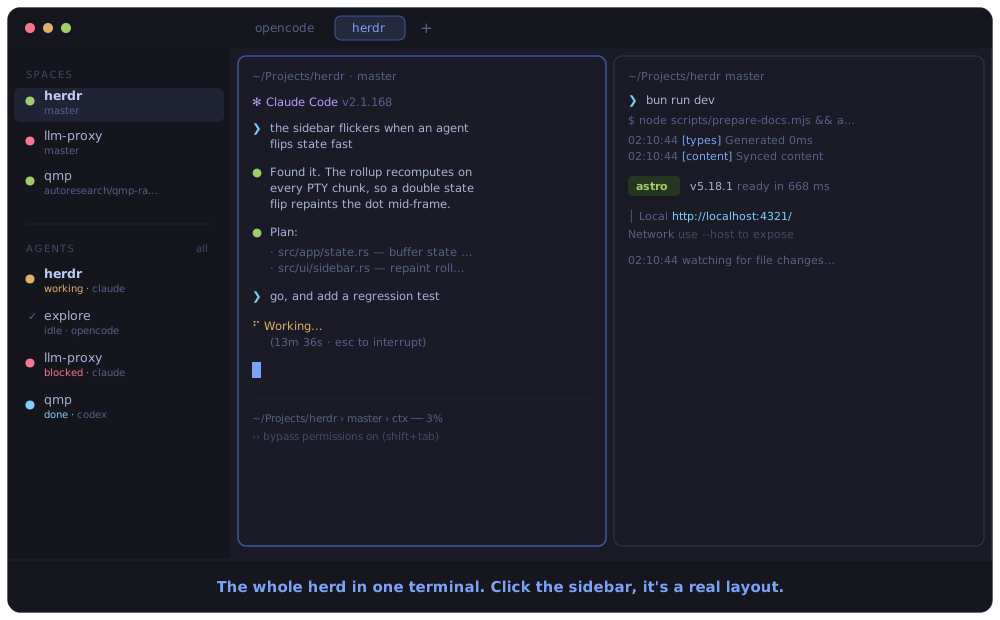
The workflow that early users describe is the honest sell. One HN commenter who’d been running “about a dozen different terminal windows, each with multiple tabs” moved to Herdr for the organization (project workspaces, tabs) and the persistent backing process: SSH into the box over Tailscale, run herdr, and see every active session — then do the same “from my phone and iPad using Prompt/Termius” (Hacker News). That phone-over-SSH access is the recurring reason people pick Herdr over a desktop app: it’s just a terminal, so anything that can SSH can drive it.
How it compares
The comparison that matters is tmux, and Herdr is fair about it: tmux gives you persistence and panes, but it predates agents and has no idea which pane is blocked. You can approximate agent-awareness on tmux — a bell character on completion, per-harness stop hooks, pane renaming/coloring driven by the agent (Zellij users do the same with a stop hook). Several HN commenters pointed this out, and they’re right. The difference is that on tmux you wire each one yourself, per harness, and still have no single rolled-up view of the fleet; Herdr gives you that view with no config.
| Dimension | Herdr | tmux |
|---|---|---|
| Persistent PTY sessions | ✓ | ✓ |
| Detach / reattach, SSH in | ✓ | ✓ |
| Panes, tabs, workspaces | ✓ | ✓ (panes/windows) |
| Semantic agent state (blocked/working/done) | ✓, zero-config | — (DIY via bell/hooks) |
| Mouse-native by default | ✓ | partial, needs config |
| Agents can orchestrate it (socket API) | ✓ | scriptable, not agent-shaped |
| Remote attach that preserves image paste | ✓ (--remote) | breaks with ssh + tmux |
| Maturity / ubiquity | young (v0.7.x, 2026) | decades, everywhere |
| Footprint | ~10MB Rust binary | tiny, preinstalled almost everywhere |
Be fair to tmux: it’s battle-tested, preinstalled or one package-manager command away on any box, endlessly scriptable, and it does far more than herd agents. If your remote machines already have tmux and a bell-on-done hook covers you, that’s a legitimate, zero-new-dependency setup. Herdr’s bet is that a shared, zero-config fleet view plus an agent-drivable API is worth adopting a new, younger tool for.
Against the GUI managers (Conductor, cmux, Emdash), the trade flips: they show agent state too, but they’re apps — often macOS-only, sometimes closed — that run agents on the host and move the workflow into their wrapper. Herdr stays in the terminal, runs anywhere you can SSH, and can sit inside your existing sandbox. One HN user preferred Conductor and called running-in-the-terminal “a flex” with no real advantage; others countered that phone-over-SSH access and being able to launch inside a sandbox are exactly the advantages (Hacker News thread). Which side you land on depends on whether you value the desktop UX or the terminal’s reach.
Performance and benchmarks
Herdr doesn’t publish performance benchmarks, so there are no latency or memory numbers to cite — don’t expect any here. What exists is adoption signal, which is not the same thing: the repo shows ~10k GitHub stars and ~592 forks, and its badge claims #1 on GitHub Trending for June 30, 2026, with a lively HN discussion around the same time (GitHub, Hacker News). Treat that as “it got attention fast,” not as evidence of stability or throughput. It’s a young project — v0.7.1 was the latest release as of June 24, 2026, i.e. pre-1.0.
Tradeoffs
The honest cons, several straight from skeptical early users:
- It’s young and pre-1.0. v0.7.x, moving fast, Windows still preview-only. tmux has decades of hardening; Herdr does not. If you need boring reliability on a critical box today, that’s a real point against.
- The problem may not be yours. More than one commenter said they don’t run enough parallel agents to feel the pain — two Codex sessions already feels like plenty. If you’re not juggling several agents, Herdr solves a problem you don’t have, and plain tmux (or one terminal) is simpler.
- tmux + a hook can approximate it. Bell-on-completion or a stop hook gives you a signal cheaply, with no new dependency. Herdr’s edge is the rolled-up, no-config fleet view — valuable, but not magic.
- AGPL + commercial licensing. The AGPL-3.0 copyleft matters if you’d embed or redistribute Herdr; a separate commercial license exists for organizations that can’t comply. Fine for personal use, worth a look for corporate deployment.
- New reserved key and model to learn.
ctrl+bas prefix will collide with muscle memory (vim users especially), same as tmux — remappable, but it’s another tool’s keymap in your head. - State detection is heuristic. Out-of-the-box classification leans on process names and output patterns, and it’s uneven per agent: the README marks blocked-state detection “partial” for pi and unsupported (”—”) for Kiro, until you install a native integration.
Takeaway
Reach for Herdr if you routinely run several coding agents and the pain is coordination — not knowing who’s blocked, losing sessions on disconnect, wanting to check the herd from your phone over SSH. Its one genuinely differentiating feature is zero-config semantic state inside a real, persistent, terminal-native multiplexer, plus a socket API agents can drive. Stick with tmux if it’s already on your boxes and a bell-on-done hook is enough, or if you run one or two agents and don’t feel the mess — tmux is older, ubiquitous, and does more. The one thing to remember: Herdr is tmux’s persistence and panes with an agent-aware sidebar bolted into the core instead of scripted on top — worth it exactly when a fleet of agents has outgrown your ability to eyeball a wall of tabs.